Guide
Welcome to the Atomic guide. Here you'll find detailed explanations of all features.
Sections
Program builder
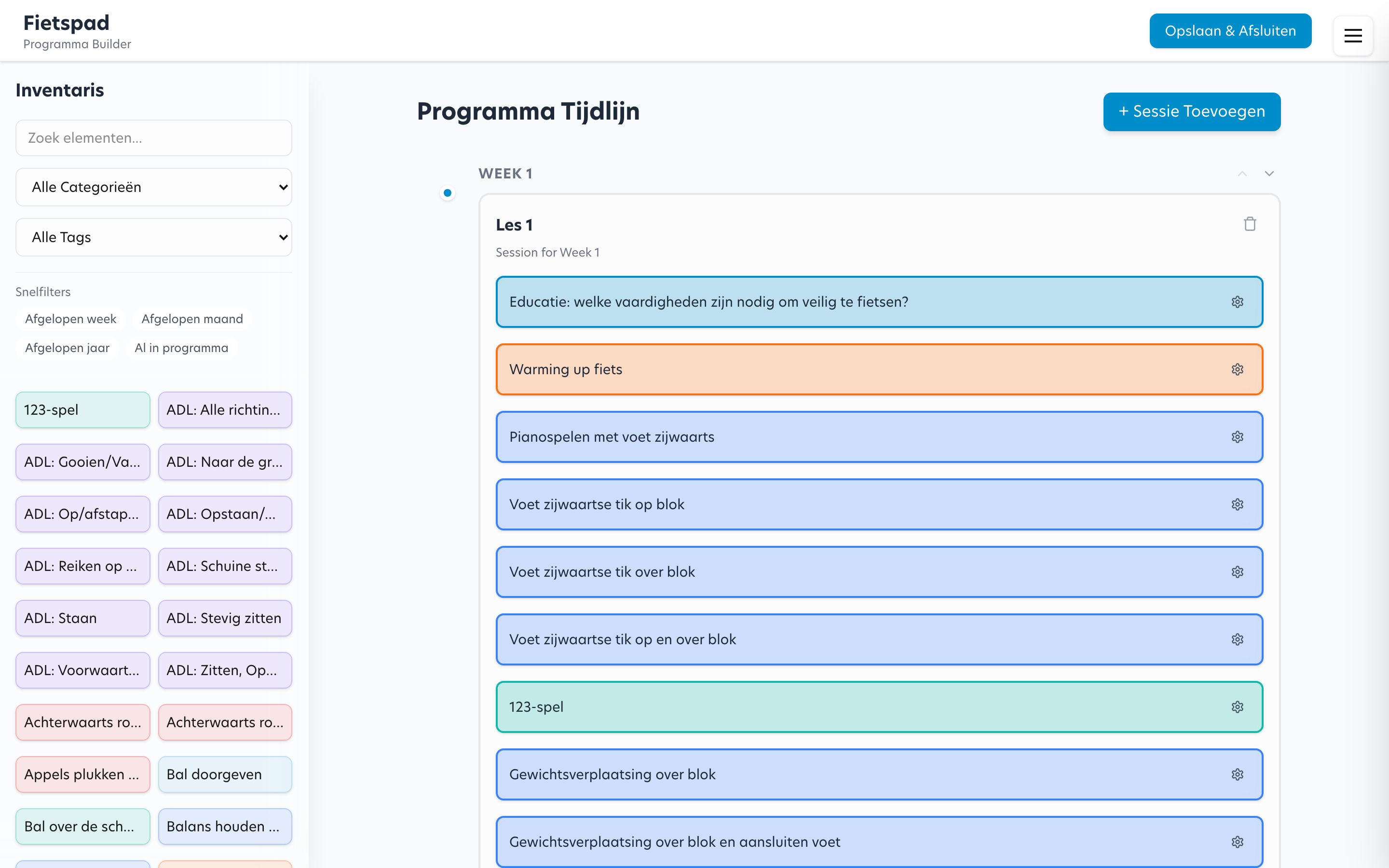
The program builder is the heart of Atomic. Here you compose treatment programs by:
- Adding sessions to a program (per week)
- Dragging elements from the element list into a session
- Adjusting the order by dragging elements within a session
- Marking elements as CORE (mandatory) or OPTIONAL (optional)
Drag & drop
Drag elements from the right panel into a session. Within a session you can reorder elements by dragging them.
Matrix view
The matrix view shows an overview of all elements per session in a program. This is useful for:
- Quickly seeing which elements appear in which week
- Checking for overlap or gaps in the program
- Reviewing the distribution of themes across the program
Element library
In the element library you manage all available elements. You can:
- Filter elements by theme, group and tags
- View and edit element details
- See in which programs an element is used
To be expanded
This guide will be expanded step by step with detailed instructions per feature. Missing information? Let the team know.